
llms.txt is a plain Markdown file you place at the root of your website (yourdomain.com/llms.txt). It gives AI systems a short, curated index of your most important content, each link with a one-line description, so a model does not have to fight through your menus, scripts and cookie banners to understand what you offer.
It is one of the smaller signals in optimizing your site for AI search. It is also one of the most over-hyped, because the standard is young and, as the data below shows, most AI crawlers do not fetch it yet. This guide covers what goes inside the file, how to ship one in about 15 minutes, and the honest case for and against bothering.
Where did llms.txt come from?
llms.txt was proposed by Jeremy Howard of Answer.AI on 3 September 2024. His observation was simple: websites are built for people and browsers, while language models get lost in navigation, ads and JavaScript, and their context windows are too small to swallow a whole site. His fix was one Markdown file at the domain root that summarizes the site and points to what matters.
The idea borrows the shape of two files webmasters already know. Like robots.txt and sitemap.xml, it sits in the root and speaks to machines. Unlike them, it does not forbid or enumerate; it curates and explains. Think of it as a one-page briefing you hand a model before it reads anything else.
What goes inside an llms.txt file?
The format is deliberately minimal Markdown: a title, a short description, and a few sections of links with context. A sensible file for a small service business fits in 20 to 30 lines. The point is not completeness; it is pointing the model at the handful of pages that answer a customer’s question.
A workable structure looks like this:
- An H1 with your business or project name (the only strictly required element).
- A blockquote (a line starting with
>) describing what you do, for whom, and where, in two or three sentences. - H2 sections grouping links by theme: services, pricing, contact, key articles.
- Link lists where every link carries a one-sentence description, so the model knows why it would open that page.
Two details do most of the work. Put prices in plain text, so a model answering “how much does X cost” has a number it can attribute to you. And describe every link, because a bare URL tells a model almost nothing while one sentence of context tells it a lot. The spec also defines a fuller variant, llms-full.txt, which inlines entire pages; a small business rarely needs it.
Does llms.txt actually work?
Here is the honest answer: it is a low-cost signal, not a lever, and today most of the systems it targets ignore it. Google has said plainly that neither Search nor its AI features use the file, and independent log data shows AI crawlers rarely request it. Treat llms.txt as a cheap insurance policy, not a growth tactic.
The evidence is worth knowing before you spend a minute on it:
- Google does not use it. Google’s AI optimization guide (updated June 2026) states you do not need special machine-readable files or Markdown to appear in Google Search or its generative features, because Search does not use them. Gary Illyes of Google has said Google does not support llms.txt and has no plans to, and John Mueller compared the idea to the long-abandoned keywords meta tag, a self-declared signal that was too easy to game.
- Almost nothing fetches it. Ahrefs analyzed 137,210 domains and found that 97% of llms.txt files received zero requests in May 2026 (study published June 2026). Of the files that did get traffic, 77% of the bots were not AI tools at all; SEO audit crawlers led the way, not ChatGPT or Claude.
So why mention it at all? Because the cost is close to zero, and writing the file forces something more valuable: putting your offer, prices and location in one clean place. If you struggle to summarize your business in a Markdown file, you probably have the same gap on your website, just harder to see. The file is the reward and the diagnosis at once.
In our pilot on 1 July 2026, we checked one dental practice website using a set of ten queries through web search with AI synthesis. Two branded queries produced clear inclusion in the answer, seven produced no inclusion, and one result was ambiguous. Our method and limitations explain how to interpret this small sample.
How to add llms.txt in 15 minutes
Adding the file means creating a plain text document and uploading it to your site’s root. You do not need a developer or a plugin, just access to your hosting and a quarter of an hour.
- Create a text file named
llms.txtin any editor (Notepad, TextEdit). Save it as UTF-8. - Write the header and description: a line
# Your business name, then a>blockquote of two or three sentences on what you do, for whom and where. - Add H2 sections: services with prices, contact, and links to your most important pages, each with a one-sentence description.
- Upload it to the root of your site, next to robots.txt, via FTP, your host’s file manager, or a file plugin on WordPress.
- Check it in a browser by opening yourdomain.com/llms.txt. If your text shows up, it works.
- Keep it current. An out-of-date price in llms.txt is worse than no file, because a model may quote it with full confidence.
One order-of-operations note: before you add llms.txt, make sure your robots.txt is not blocking AI crawlers. The best file in the world does nothing if the crawler is turned away at the door. We cover both in the AI SEO audit checklist.
So do you need an llms.txt file?
If you run a business website and care about AI visibility, adding one is a reasonable yes, on strictly economic grounds: 15 minutes of work for a chance that some AI tools get your services and prices handed to them cleanly. It carries no risk, since the file blocks nothing and cannot hurt your Google rankings. Just do not expect it to move the needle on its own.
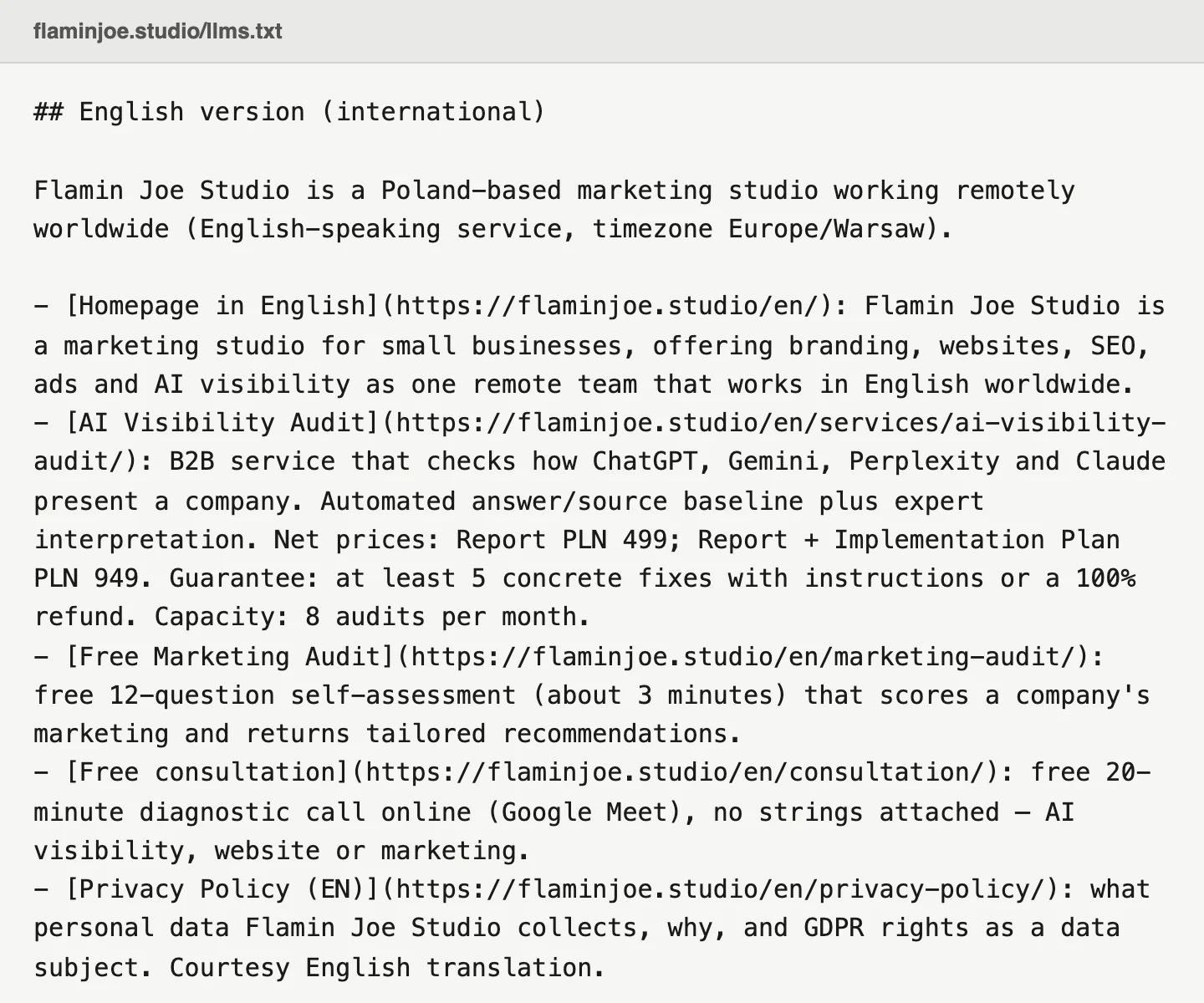
We practice what we recommend. Our own file lives at flaminjoe.studio/llms.txt, with a description of the studio, the audit service and prices, contact details, and a list of guides, each with a one-line summary. Not because we believe in the magic of a single file, but because we tell clients to ship a full set of signals, and it would be odd to skip our own front step.
llms.txt is one line on a longer list. If you want to know how your whole site scores across the signals that AI tools actually weigh, that is what our AI visibility audit checks: 39 criteria across 6 areas, a repeatable measurement of ChatGPT, Gemini, Perplexity and Claude, and an expert reading with prioritized fixes. The presence and quality of llms.txt is one criterion among them, and the guarantee is plain: at least 5 things to fix with instructions, or a full refund. Not sure it is worth it yet? Book a free 20-minute consultation and we will tell you honestly.
FAQ
Does llms.txt replace robots.txt or sitemap.xml? No. robots.txt still controls where crawlers may go, and sitemap.xml still lists your URLs for search engines. llms.txt is a third, separate file with a different job: summarizing your business for AI models. A well-prepared site can have all three.
Does Google read llms.txt? No. Google has confirmed that neither Search nor AI Overviews use the file, and its own crawlers do not even request it. llms.txt targets other systems, mainly AI assistants, and even there most crawlers ignore it today. Your Google visibility rides on classic SEO, structured data and content.
Can llms.txt hurt my SEO? No. It is a plain text file that search engines do not treat as page content. The only real risk is stale information inside it, so update the file whenever your prices or offer change.
What is llms-full.txt? It is an extended variant that inlines the full text of your key pages into a single Markdown file, rather than just linking to them. It suits large documentation sites. A small service business is fine with the basic llms.txt.